OpusClip vs Submagic vs a Human Editor in 2026: OpusClip Bills the Minutes You Upload, Not the Clips You Keep
OpusClip pricing: 1 credit per uploaded minute. Submagic uses 8 per Magic Clip. Review time matters when comparing either tool with a human editor.

What are OpusClip, other short-video editing tools and a human short-form editor, and what is this comparison not?
OpusClip turns long recordings into short-form candidates. It identifies potential highlights, assigns engagement-oriented scores, reframes footage vertically, and adds captions. Its processing credits follow the length of the imported video.
A short-video editing tool can focus on editing and caption styling. Its Magic Clips feature adds a long-to-short workflow. A human editor can handle selection, pacing, captions, and deliberate framing, with the scope agreed before work starts.
This comparison concerns repurposing existing recordings. Full-episode cleanup belongs under YouTube video editing, a separate production task.
For finished shorts with editorial review included, done-for-you short-form video editing is the relevant alternative. Neither workflow should be confused with generating videos from scratch or comparing every editing app.
How to run the comparison and define a “usable” clip
Use one identical raw take across all three workflows: no longer than 15 minutes, two speakers, and several hard-to-spell names. Keep source resolution, audio, vertical output format, and target clip length consistent.
Record each software plan, billing period, price, and processing settings before starting. Give the human editor the same footage and creative brief. A shared spelling sheet also makes caption checking fairer.
Define “usable” before reviewing any output. A passing clip should have an immediate hook, enough context, correct names, accurate captions, and appropriate speaker framing. It must need no essential correction before posting.
Log candidate count, usable-as-is count, fixing minutes, caption errors, reframing misses, processing time, and revision time. Separate active labor from waiting. IntentClose, the publisher, sells the human-editing option discussed in this comparison.
Which moments should you compare from the same take?
Compare selections by source timestamps, rather than export filenames. Two tools may choose the same answer but create different opening hooks or endings. Those differences can determine whether the clip makes sense independently.
Track how many candidates each workflow produces and how many moments overlap. Then check whether the human editor’s strongest selection appears among the automated candidates.
For OpusClip podcast clips, compare the virality scores of moments you keep against those you reject. Treat the score as a sorting aid. Your publishing objective still determines whether a compelling sentence belongs in the final queue.
For example, an intriguing claim may depend on a qualification earlier in the conversation. A worthwhile selection preserves that qualification or chooses another moment. This is where reviewing the whole argument matters more than reviewing the opening line.
How to measure usable clips and the time spent fixing them
Record results in the same order for each workflow: usable count, fixing minutes per clip, caption errors, reframing misses, and turnaround. Consistent reporting makes the human video editor vs AI comparison easier to evaluate.
For OpusClip, count clips that pass untouched, then time corrections on those worth rescuing. Include the minutes spent watching rejected candidates. Check names, sentence boundaries, and whether automated speaker tracking follows the correct person.
Apply the identical standard after the automated clipping workflow and any styling changes. Separate cosmetic preferences from essential repairs. Changing a caption color is different from correcting a guest’s name.
For the human delivery, count approved clips and record your briefing, review, and revision time. Human involvement reduces your editing workload only when quality control is genuinely included.
Software may return candidates within minutes; human production commonly takes days, with revisions adding time. Measure time to approval alongside initial delivery speed. The review queue is part of the production cost.
Why do AI clips need so much fixing?
AI video clipping software speeds up discovery, but each candidate still needs an editorial decision. The workload grows when selection, captions, and framing all require attention.
Why can reviewing take longer than expected?
Every candidate needs enough attention to accept or reject it. Generating more options can increase this sorting workload, even when processing itself is fast.
Set a review budget per episode. If you exceed it repeatedly, narrow the source segment or change the workflow.
Why does a clipper return so many candidates?
Transcript patterns and engagement signals help software identify potentially interesting moments. A broad selection improves your chances of finding something useful, but also creates more material to inspect.
Prioritize clips matching your audience’s questions. A high score alone should not determine your publishing schedule.
Why do its picks miss context?
Automated selection can misjudge an omitted setup, an unfamiliar name, or a speaker’s qualification. Vertical reframing can also follow the wrong face during overlapping speech.
Supply a spelling sheet and check the surrounding conversation before approving sensitive or technical claims.
Why doesn’t paying more solve the judgment problem?
Higher allowances primarily expand capacity, although plans may also add editing features. More processing credits do not guarantee that every selected moment represents the guest accurately.
You can perform that judgment yourself or include it in a human review brief.
Can a short-video editing tool handle a full podcast episode?
A short-video editing tool can support long-to-short processing through automated clipping. Regular uploads and Magic Clips are different routes, so their limits should not be treated as interchangeable.
Regular upload limits vary by tier, including two-, five-, and 30-minute limits. A 15-minute comparison take therefore exceeds the shorter standard-upload allowances. For longer recordings, check Magic Clips eligibility and its current input limits before subscribing.
Magic Clips uses eight credits per generated clip, while a regular upload uses three credits. A 45-credit allowance can cover five eight-credit clips, leaving five credits if nothing else consumes them.
That distinction matters when estimating editing tool costs for podcast episodes. Budget for candidate generation, then measure how many candidates become publish-ready shorts. Confirm the credit balance before and after processing rather than assuming every long-video run has one fixed cost.
Why do OpusClip and other short-video editing tool prices look different on every comparison page?
Three variables change the headline comparison: when pricing was checked, whether billing is monthly or annual, and what the allowance buys.
OpusClip credits measure source-video processing. An editing tool's credits can cover different actions, including uploads and automated clip generation. Matching the subscription price without matching the workload produces a misleading comparison.
US subscription costs and billing units
For planning, OpusClip’s entry paid options sit roughly in the $15 to $30 monthly range. Submagic’s Starter pricing falls around $12 to $19 per member per month, depending on annual or monthly billing. Confirm current checkout terms before purchasing.
OpusClip uses one processing credit per minute of imported video. A 15-minute source therefore uses 15 processing credits, regardless of whether you keep one resulting clip or several.
To calculate your effective OpusClip cost per minute, divide the subscription charge by the processing minutes you actually use. Unused capacity raises that effective cost. For a credit-based editing tool, calculate how many automatically generated clips your allowance supports after other credit-consuming actions.
What the free plans actually give you
OpusClip’s free allowance includes 60 processing credits per month. That can help you evaluate selection and reframing on a limited amount of footage.
Before testing either free option, check watermark rules, export access, resolution, and which clipping features are included. Export a representative clip early so account restrictions do not become a surprise at publishing time.
What does one usable clip really cost once you count your fixing time?
Use the accepted clip as your denominator. Counting every generated candidate makes a low-quality output queue look artificially economical.
The practical formula is:
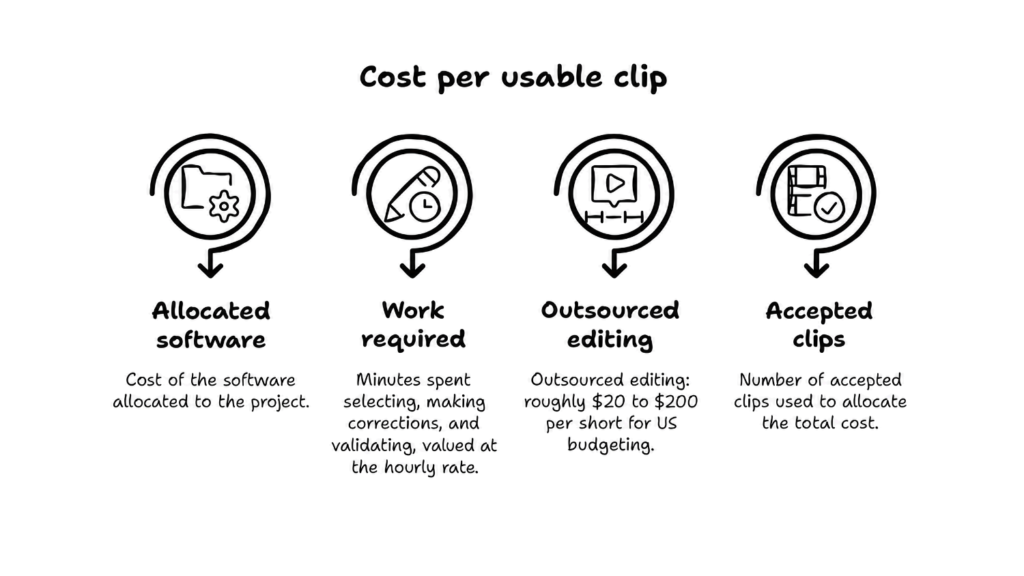
Cost per usable clip = (software cost + value of all active production time) ÷ accepted clips.
Active production time includes setup, reviewing rejected candidates, fixing retained clips, exporting, and final checks. For outsourced editing, substitute the service charge and count your briefing, approval, and revision time.
Consider an illustrative monthly scenario, rather than a performance benchmark. A software budget of $20 to $30 spread across ten accepted clips contributes $2 to $3 per clip.
Suppose your time is worth $30 to $60 an hour, and total hands-on work averages ten minutes per accepted clip. Labor adds $5 to $10, bringing the combined cost to roughly $7 to $13 per usable clip.
At 30 minutes of hands-on work per accepted clip, the same calculation rises to approximately $17 to $33. The subscription barely changes; your workload drives the difference.
For US budgeting, human short-form editing can span roughly $20 to $200 per short. Treat that as a broad planning range, with complexity, raw-footage review, branding, turnaround, and revisions affecting the quote.
AI becomes attractive when you use the allowance consistently and corrections stay light. Human editing becomes easier to justify when review time is expensive or a small publishing schedule leaves much of your subscription unused.
Is there anything better than OpusClip for podcast clips?
The best AI clipping tool depends on your bottleneck. OpusClip is a practical fit when you need to search long recordings for candidate moments and can manage the review yourself.
A caption-focused editing tool deserves consideration when caption styling and hands-on short-video finishing dominate your workflow. For multilingual publishing, check the exact languages and features you need, then test names and specialist vocabulary in those languages.
A human editor is better positioned to make accountable editorial decisions when the brief includes context checking, verified spellings, and deliberate reframing. Ask for those tasks explicitly rather than assuming every editing package includes them.
Compare uploaded-minute economics, accepted-clip rate, and approval time separately. A tool can be inexpensive to run yet costly to supervise. Another workflow can cost more upfront while consuming much less of your working week.
Which should you choose: OpusClip, another short-video editing tool or a human editor?
Choose OpusClip when you have many long recordings, need broad candidate discovery, and have time to review. It can be enough when audio is clear, speakers stay visually distinct, and strong moments stand alone.
Consider a caption-focused editing tool when caption design and short-video finishing are central to your process. Its Magic Clips route also belongs on your shortlist when its input limits and credit allowance match your podcast workload.
Hire a human editor when you publish fewer episodes, names and brand details matter, and reviewing drafts disrupts higher-value work. Before choosing a monthly short-form editing package, confirm whether selection from raw footage, caption correction, and revisions are included.
A hybrid workflow can also work: use automation for discovery, then commission a human pass on three to seven promising moments. Agree whether the editor can replace weak selections instead of merely polishing them.
Agencies can use a white-label human review pass before delivering client clips. Define ownership, confidentiality, approval responsibility, and delivery expectations so the handoff actually removes work.
Conclusion
OpusClip charges for uploaded minutes regardless of how many clips you keep, so compare AI clipping tools with a human editor by cost per usable clip, including your review and correction time. If review is your bottleneck, start with one short-form edit from IntentClose and measure your approval workload before committing to a monthly service.
Key takeaways
- OpusClip uses one credit per uploaded minute, regardless of how many clips you keep.
- Compare cost per publish-ready clip, including review, corrections, and final checks.
- AI-generated clips need checks for context, caption accuracy, and speaker framing.
- Upload limits, credit rules, and billing terms vary across tools and plans.
- Human editing can reduce your workload when selection and quality control are included.
- Test each workflow on identical footage and measure time to approval.
FAQ
Which do I pay for with OpusClip: the minutes I upload or the clips I keep?
You pay for the minutes you upload. OpusClip processing credits follow the original imported video's duration, at one credit per minute of processing. A 15-minute episode uses 15 credits whether you keep one clip or ten.
Since the charge is set before you review anything, the real saving comes from choosing which recordings or segments you upload. Check your credit balance before and after each run so no surprise appears at the end of the month.
Should I choose OpusClip or another short-video editing tool to turn a full podcast into shorts?
The better pick depends on where your time goes. OpusClip centers on finding candidate moments inside long recordings, which suits you if you have many episodes and time to review. Another short-video editing tool can offer automated clipping for long-to-short work alongside caption-focused editing, which suits you if caption styling and finishing dominate your process.
To decide, run the same footage through both and compare episode limits, credits used, accepted clips, and the minutes you spend correcting each one. The cheaper plan is not always the lighter workload.
When is a human editor a smarter choice than AI clipping software?
A human editor makes more sense when reviewing candidates and checking quality eats more of your week than the software saves. This is most likely with technical discussions, unfamiliar names, brand-sensitive content, or clips that need careful context.
Before you commit, confirm the package includes selecting moments from raw footage, correcting captions, and revisions. If those checks are included, you hand off the judgment work as well as the cutting.
Post-ready shorts in 72 hours, checked by a human.
Get your shorts edited
Written by
Tanguy Hubner · Founder, IntentClose
I cut shorts every week for creators, real estate teams and agencies, in After Effects with my own automation on top. 163 reviews, 1,000+ deliveries, 11 years in the trade.
This article came out of the same pipeline I run for clients. Let me write yours →